


SmartPaste.
Paste the way you want. Not the way it lands.
A Windows clipboard manager that understands what you copied and offers it already in the right format — the moment you paste it, not before.
Three steps. Only one is new.
No habit to change: Ctrl+C works exactly as before, in any program.
SmartPaste recognises the content — JSON, a colour, a table, a link, messy text from a PDF — and shows every available transformation in one palette.
Arrows to browse, Enter to confirm. The content lands already cleaned, formatted or converted, exactly where you were typing.
Six formats. One shortcut.
JSON
Format or minify automatically. From an unreadable blob to a readable structure in one keystroke.
CSS colours
Detects hex, rgb and hsl and converts between them on the fly.
URL
Turns a raw link into a Markdown reference ready for notes or documentation.
Tables and CSV
A CSV pasted from Excel becomes a formatted, aligned Markdown table, ready for a README or a note.
HTML
Converts complex markup (real web pages included) into clean Markdown or plain text, keeping structure and links — a real parser, not a brittle regex.
Text from PDFs
Stitches back the line breaks and hyphenation typical of text copied from a PDF, returning a readable paragraph.
The real control panel.
More options, not just one recommendation.
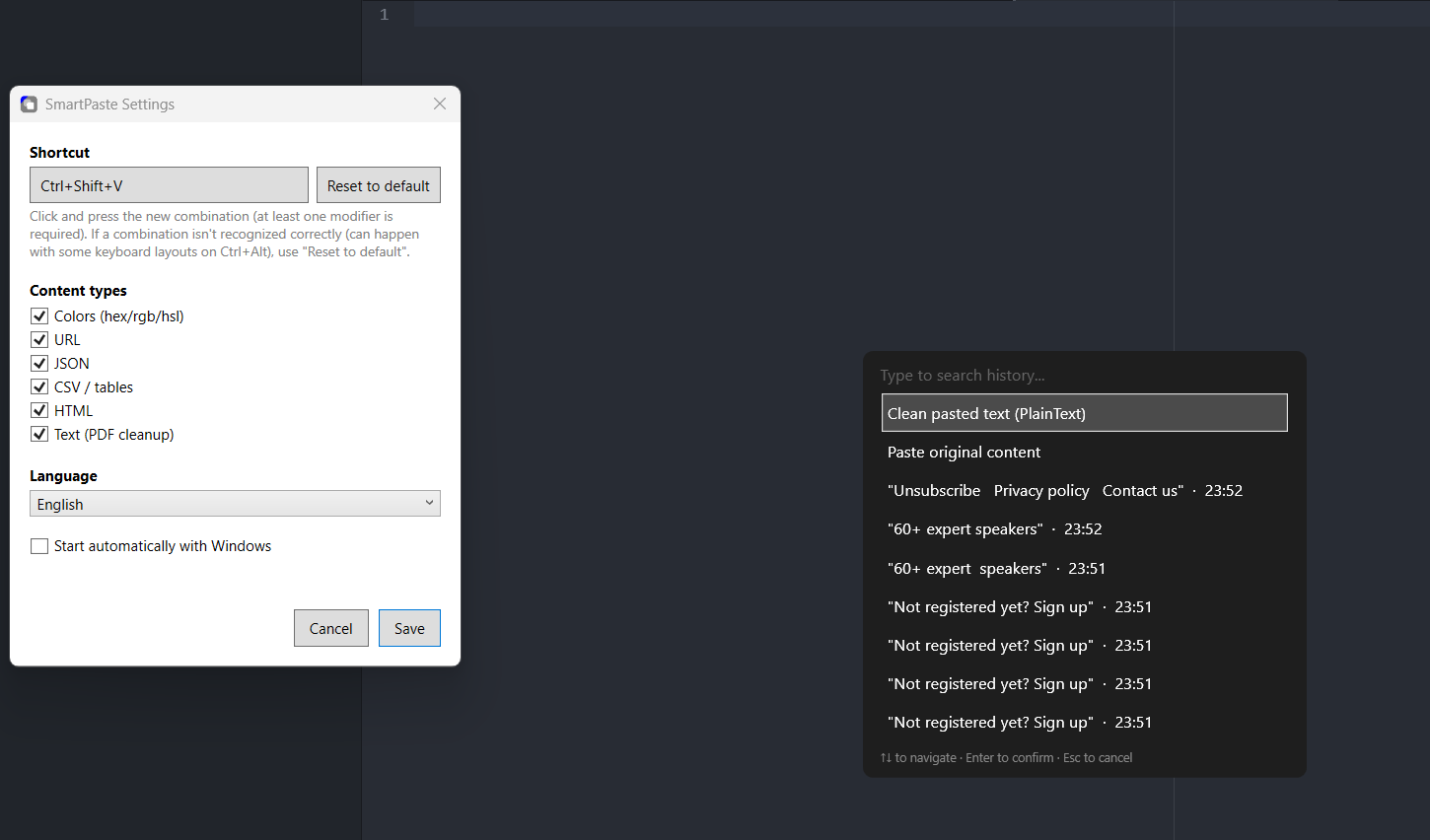
For every copied item, SmartPaste shows all applicable transformations — not only the default one. JSON can be formatted or minified, HTML converted to Markdown or plain text: the choice stays yours, one keystroke at a time.
A history that remembers, not just the last item.
Everything you copy stays searchable in the same palette — persisted locally, never on a server. Type to search, even after restarting your PC.
Zero cloud, for real.
No data leaves your PC. No account to create, no telemetry, no server SmartPaste could ever talk to — and it is verifiable, because the code is public.
It adapts to you, not the other way round.
Customisable shortcut, every content type individually on or off, interface available in Italian, English and Spanish, optional auto-start — all from Settings, with nothing to reinstall.
It respects your secrets.
Passwords and sensitive data copied from a password manager never reach the history: SmartPaste recognises and honours the standard used by Bitwarden, 1Password and similar.
Is it free?
Yes — free for personal, non-commercial use, and the source code is public on GitHub.
Is my data sent anywhere?
No. Everything — history included — stays stored locally on your PC. SmartPaste never connects to any server.
Does it need administrator rights?
No — the installer requires no elevated permissions and can be uninstalled at any time like any normal program.
Does it work with any program?
Yes: SmartPaste pastes straight into whatever app was in the foreground — text editors, browsers, email, IDEs — with no specific integrations needed.
Is it available in other languages?
Yes: the interface is available in Italian, English and Spanish. It is detected automatically from your Windows language, and you can change it at any time in Settings.